
Jimbo’s Rack — ESP32 UniFi monitor
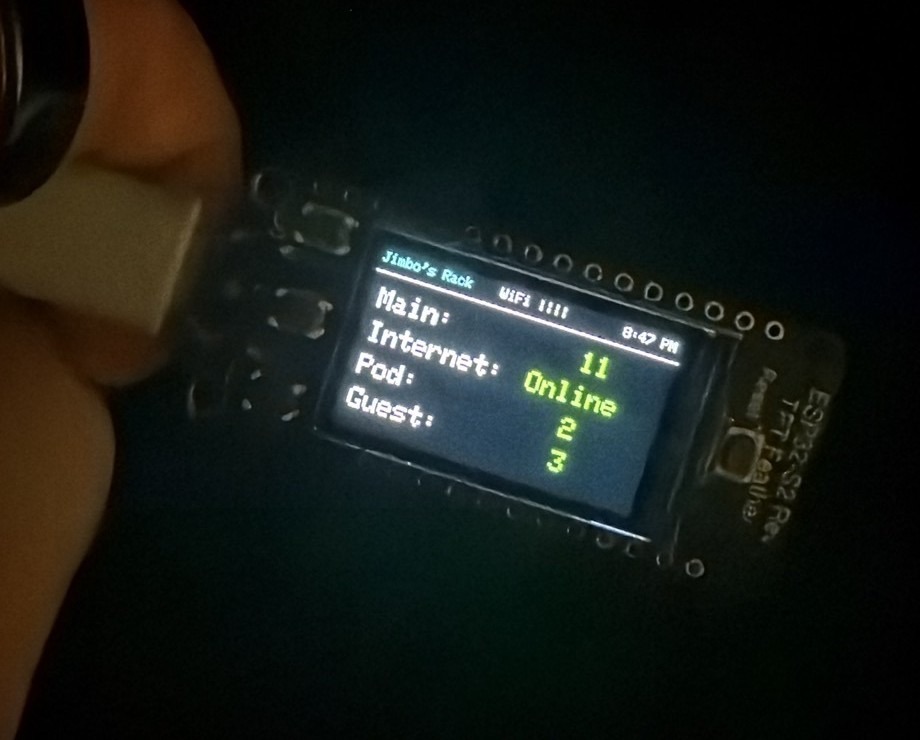
A tiny always-on TFT in the rack that shows UniFi Wi‑Fi client counts and whether the internet is up — fed by Home Assistant over MQTT. No laptop, no UniFi UI.
Why it exists
UniFi and Home Assistant already know who’s on the network. I still end up opening a browser to answer dumb questions: How many clients are on Main? Is Guest quiet? Did the WAN drop? Jimbo’s Rack answers that from three feet away on a Feather TFT sitting in the rack.
Hardware
- Adafruit ESP32‑S2 Reverse TFT Feather
- Built-in 1.14″ 240×135 TFT (ST7789)
- Wi‑Fi (no Bluetooth on S2), USB‑C, STEMMA QT / Qwiic for future sensors
- 4 MB flash, 2 MB PSRAM, on-board battery charging if I ever run it soft-mounted
Dev environment is OpenSUSE Tumbleweed with VS Code + PlatformIO (Arduino framework). CircuitPython is fine for prototypes; this project is compiled C++ so redraw and MQTT stay snappy.
Architecture
UniFi → Home Assistant (client-count entities) → MQTT broker → ESP32 → TFT. HA owns the “truth,” the Feather is just a dumb bright display. That means I can change which networks map to which lines without reflashing firmware — swap the entity IDs in the HA automation.
Publish cadence is about every 10 seconds on these topics (names only — no host/creds here):
jimborack/main_clients— integerjimborack/pod_clients— integerjimborack/guest_clients— integerjimborack/internet—online/offline(also accepts on/true/1)
What the screen shows
- Main — client count on the main SSID/network
- Internet — green Online / red Offline
- Pod — client count on the pod network
- Guest — client count on guest
State lives in a small DashboardState struct (client ints, internet bool,
MQTT connected flag, redraw flag). MQTT callbacks mutate that struct; the display
loop only repaints when something actually changed.
Firmware layout
PlatformIO project shape (credentials stay local, never committed for publish):
platformio.ini— board = Adafruit ESP32‑S2 TFT Featherinclude/dashboard.h— shared display stateinclude/config.example.h— template for Wi‑Fi / MQTT (realconfig.hstays private)src/mqtt.cpp— subscribe + parse the four topicssrc/display.cpp— labels/values on the ST7789- Wi‑Fi connect + NTP time sync on boot
Home Assistant side
Automation alias along the lines of “Jimbo Rack MQTT Stats”: time-pattern trigger
every 10s, then four mqtt.publish actions. Payload for clients is
{{ states('sensor.…') }} for each UniFi client-count entity; internet
payload is a simple online/offline string. Search HA for your exact Wi‑Fi / VLAN
sensor names — they vary by UniFi / HA integration setup.
What’s working vs next
- Done: PlatformIO toolchain, TFT bring-up, Wi‑Fi, NTP, MQTT, live numbers on glass
- Next: OTA updates so I am not hunting a USB cable in the rack
- Next: multi-page UI (Network / HA / servers / environment)
- Next: rack temp + fan control once the sensor / EMC2101 path is sorted
- Next: tiny history graphs; WAN-down / UPS / garage-door notification flashes
- Next: captive config page for Wi‑Fi/MQTT so secrets aren’t compile-time forever
Related projects: Home Assistant and UniFi.